
Health app#
The Health app is new in OpenCarMind EdgeOS 2.1.0. It shows the AI services in plain words: one card per page with a colour, a word, what is wrong, what it means and what to do. Every card and button is described in the manual’s Health section.
New in OpenCarMind EdgeOS 2.1.0#
Version 2.1.0 adds small AI services that look after the board itself, and a Health app that tells you about them in plain words.
Health app. Three pages: Battery, Guard and AI. Each page opens with one card that gives a colour and a word (“Check soon” or “Act now”), what is wrong, what it means and what to do. The header counts the open issues, a dot on the Health icon shows that something needs a look, and a banner with Open Health appears when a new issue starts. While you drive, a “check soon” issue is only logged.
Battery charge and health. An extended Kalman filter on a one-RC cell model gives the charge. Health comes from a count from full charge to cutoff, or from a small regression on parts of a charge, because a board on the car’s USB rarely runs flat. The board learns your cell from its first 10 charges.
Battery fault check. A small autoencoder learns what normal looks like for your cell over its first 24 hours. When 60 s of readings stop looking normal it raises an alarm, and the card names the likely reason, for example “warms up more than usual” or “loses charge while resting”. It never cuts power by itself.
Network guard. An unsupervised detector watches for floods of new Bluetooth addresses and rotating Wi-Fi access points. For the first 2 hours after every start it only learns and blocks nothing. After that a block only does safe things: no new adapter offers, the scan narrows to your paired adapter, and the Wi-Fi time round is skipped. It never cuts your adapter during a drive, and you can switch blocking off in Settings.
Pairing safety. The board keeps a fingerprint of your adapter and asks you before it pairs again or uses an adapter that behaves differently. It also refuses a Wi-Fi time that jumps more than 24 hours ahead or 10 minutes back.
Services that stay out of the way. All of them share one worker task below the screen, the models and the OBD poll, and the same response-time check that admits the models admits them. When the board is busy, they are the first thing it slows.
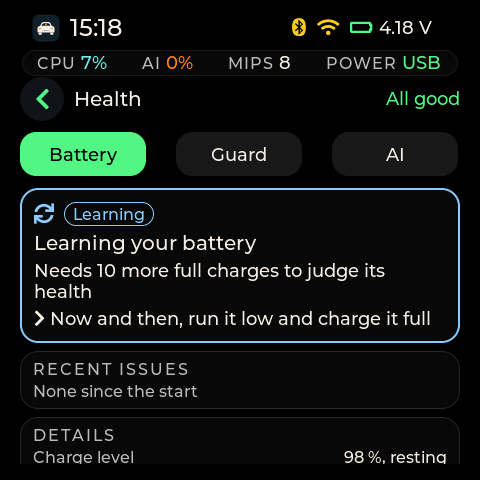
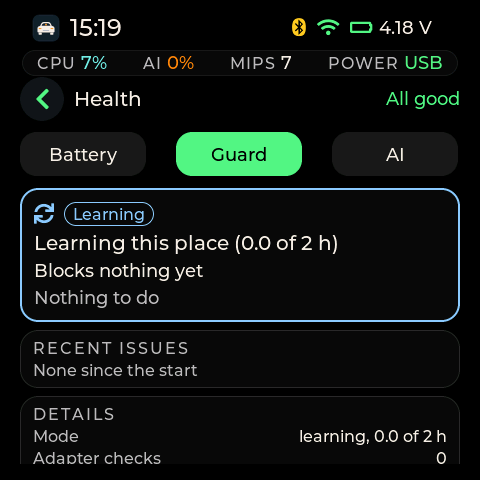
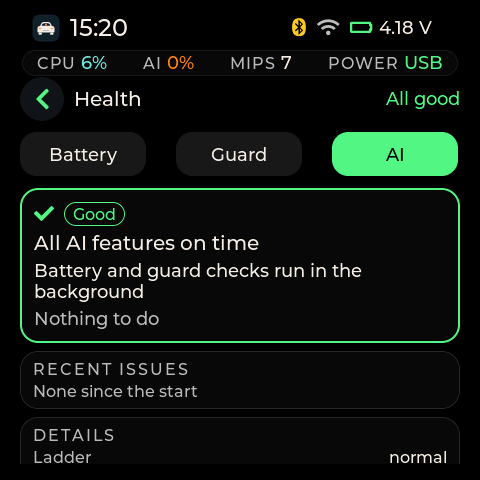
The Health app on the board, OpenCarMind EdgeOS 2.1.0, in its real state after a fresh start: the battery still learning, the guard learning the place, every AI feature on time.
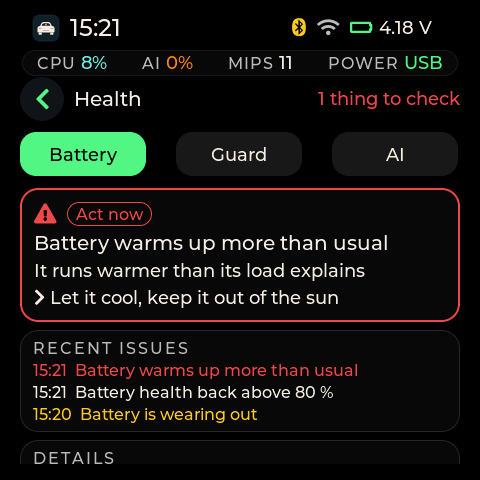
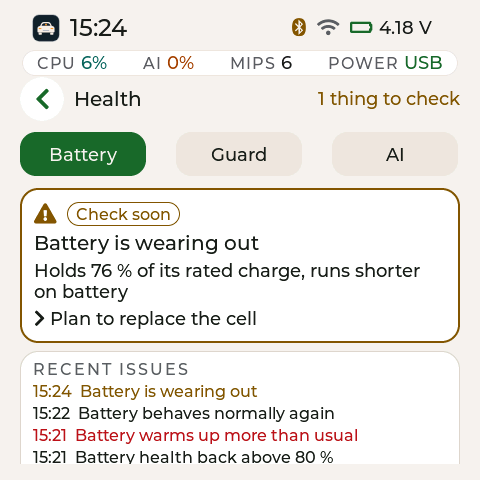
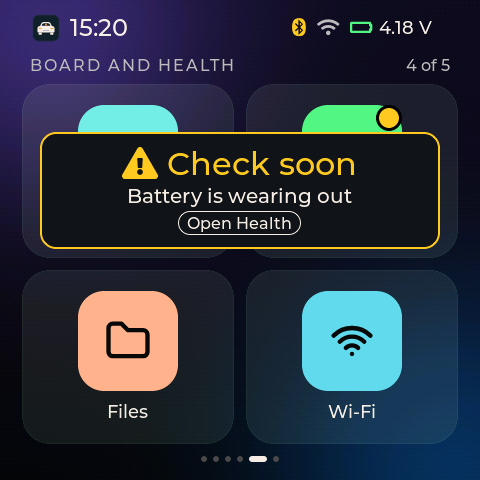
Issue cards and the banner on the board. A test build wrote each state into the Health screen only, so the battery and its gauge were never touched.
Checked on the board with the release build 81017a5: boot health good at 68.8 s, the battery estimator, the fault check and the guard all admitted (worst-case response 5.00 ms against a 1,000 ms deadline), a 614 s soak with 0 crashes, 0 screen misses and 0 AI misses, internal RAM never below 78,003 B, and the button-free download door working from the new build. Still to check in real use: pairing your own adapter, a drive, a run on battery with USB unplugged (the first charge and health readings), and a car park for the guard’s first 2 hours. The worn, fault, block and changed-adapter cards have only been shown by the test build so far.
Field fix after the first drive (proposed as 2.1.1)#
The owner’s first drive with 2.1.0 ended in a restart loop. The core dump left on the board, decoded against the release ELF, says “A stack overflow in task obd”. The task that talks to the car had used 5,104 B of its 8,192 B stack in its own frame, and the first logged row after every start loaded the pattern model file through a function with a 4,016 B frame. The bytes found past the end of the stack are the board’s own pattern centroids, value for value. Once that file existed, every start with the car answering crashed about 14 seconds in, and the boot-loop safe mode did not stop it, because the pattern layer was not one of the parts it switches off. On the bench, with a simulated car and the same file, 2.1.0 crashed on every start, five in a row. The fix keeps the connection helpers off that task’s stack and reads the pattern file in place: the deepest path inside the firmware dropped from 9,168 B to 4,416 B (tools/stack_check.py). The pattern layer now also stays off in safe mode, and every start writes one line to obd/resets.csv with the reset reason, how long the run before it lasted and the crashed task, so the next problem leaves evidence on the board.
End drive, Settings > Stop logging and Turn off now share one stop. It latches the car link off, writes the summary, closes the drive files, pauses the battery log and checks that nothing more is written. It always ends in Safe to unplug or in a named failure, within 35 seconds, and logging stays off until you tap Start logging or the board restarts. In 2.1.0, End drive saved the drive and then let the next one start at once, and a busy link could leave the drive open. The ESP-Mosaico’s POWER key switches the board off at once without saving, so Turn off comes first. Details are in the user manual.
OpenCarMind also runs on Espressif’s ESP-Mosaico[12], an ESP32-S31 board with a 480 × 480 AMOLED touch screen, 32 MB of PSRAM and a 128 MB NAND for the drive logs. Up to version 1.2.0 that build was called mossREV. Version 2.0.0 is called OpenCarMind EdgeOS 2.0.0. It is not related to Ubiquiti’s EdgeOS router software.
OpenCarMind EdgeOS comes from the same source tree as the S3 version and keeps everything mossREV 1.2.0 has: both models (CarMind R.E.V, the default on a new board, and CarMind E.V, each re-quantized for the S31), the 16 apps on the touch screen with Wi-Fi search and join, a light and a dark theme, and per-drive event logs. What 2.0.0 adds is a small operating-system layer, described below. The image above is rendered on a computer from the 2.0.0 screen code (tests/host/uishot, the same LVGL code the board runs) with example values. It is not a photo of the board. The OS layer does not change the S3 build. Up to 4aeff43, every byte the S3 chip loads was the same as in the mossREV 1.2.0 tree. The pairing change merged after the board check is behind one switch, CONFIG_OBD_BLE_PAIR_CONFIRM, which is off for the S3 by default. With it off, the S3 image built from this source equals the 4aeff43 S3 image except the build time, the ELF SHA-256 and the image’s checksum and hash (see Changes after the board check).
OpenCarMind EdgeOS 2.0.0 finished its board check, including a 10-minute soak, and 2.1.0 passed the checks listed above. The 2.1.0 image is on the EdgeOS 2.1.0 release, built from main at 1053f9d. You can also build it from this repository with the steps in docs/MOSAICO.md. The status table at the end of this section says what the board showed.
The full guide is docs/MOSAICO.md: the hardware, flashing, every app, the two models, Smart swipe and Smart UI, the storage, the NAND, the OS layer and the known limits. The OpenCarMind EdgeOS user manual explains every screen and message for a driver.