 LightEDA
One IDE for ESP32, Arduino and FPGA boards
Write code, build it, flash it and watch the serial output in one app. LightEDA works with ESP-IDF 6.1 for ESP32 chips, with Arduino sketches, and with cheap FPGA boards through the open-source Yosys and nextpnr flow. It runs on Windows 10 and 11, macOS 13 or later, and Linux.
- ESP-IDF 6.1
- Arduino
- LVGL 9.6
- Yosys + nextpnr
Private alpha LightEDA isn't released yet. The free app and LightEDA Pro open together at launch.

- 3desktop systems: Windows, macOS and Linux
- 3FPGA families: Lattice iCE40, Lattice ECP5 and Gowin
- 4debug targets over JTAG and SWD: ESP32, STM32, RP2040 and nRF52
- 107screenshots of the app below, straight from its README
- ESP32
- Arduino
- iCEBreaker
- ULX3S
- Tang Nano 9K
- Tang Nano 20K
- Tang Primer 25K
- Tang Mega 138K
- TI LaunchPads with Pro
- LVGL designer
- VHDL and Verilog
Free for everything you need to build
Toolchains download on demand from a first-run setup, the way MATLAB's and Vivado's installers work, and every download is checked against a hash pinned in the app.
ESP-IDF 6.1
Installed through Espressif's installer. Build with
idf.py, editsdkconfigthrough the same config server menuconfig uses, and flash with a progress bar.An Arduino IDE alternative
Built on the official arduino-cli, with its own data folder, so your Arduino IDE setup is left alone.
FPGA builds from open tools
Yosys, nextpnr, the family's bitstream packer and openFPGALoader, for Lattice iCE40, Lattice ECP5 and Gowin boards, from Verilog or VHDL.
Simulation
Run a Verilog test bench with Icarus Verilog or a VHDL one with GHDL, test a VHDL design from a plain
.testsfile, and read the waveform in the built-in timing diagram.On-chip debugging
Breakpoints, stepping, call stack, variables, registers, memory and a GDB console over JTAG and SWD, for ESP32, STM32, RP2040 and nRF52 targets.
An LVGL 9.6 screen designer
Works like a simpler Figma: draw pages, wire taps and swipes, try them in Play and export plain C.
An assistant that asks first
It runs on your computer, explains build errors and proposes code, and you confirm every action it takes. No account needed.
Three layouts for one project
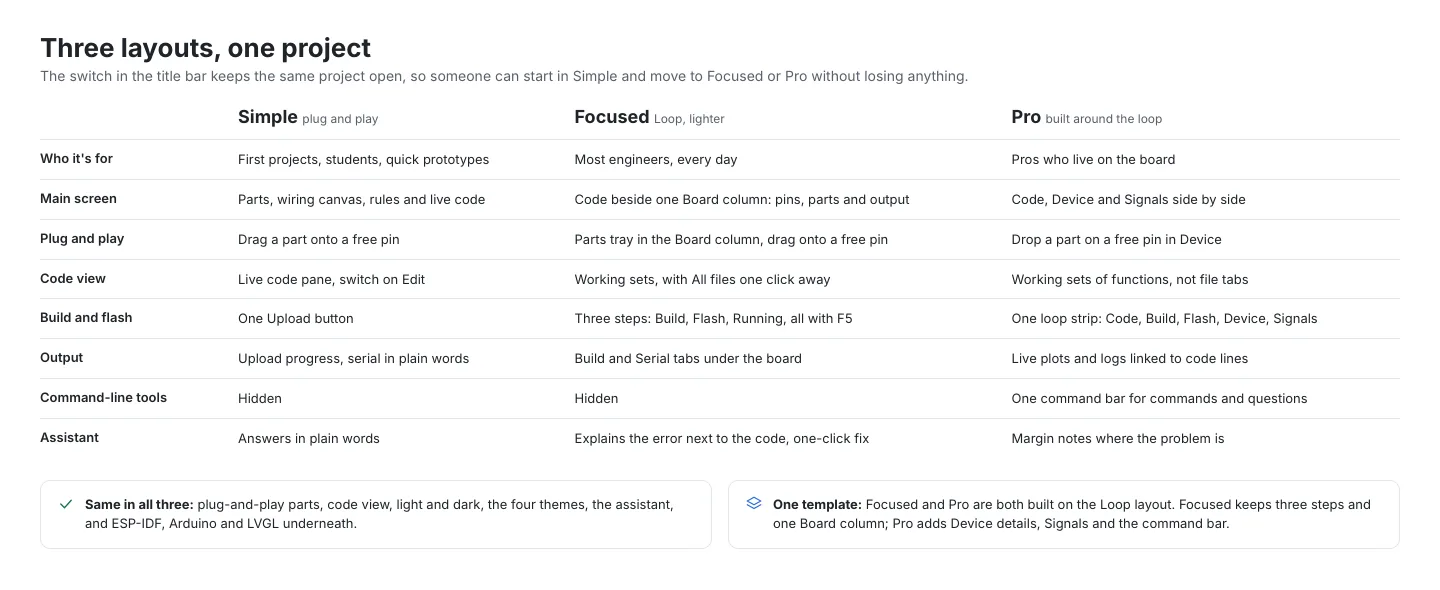
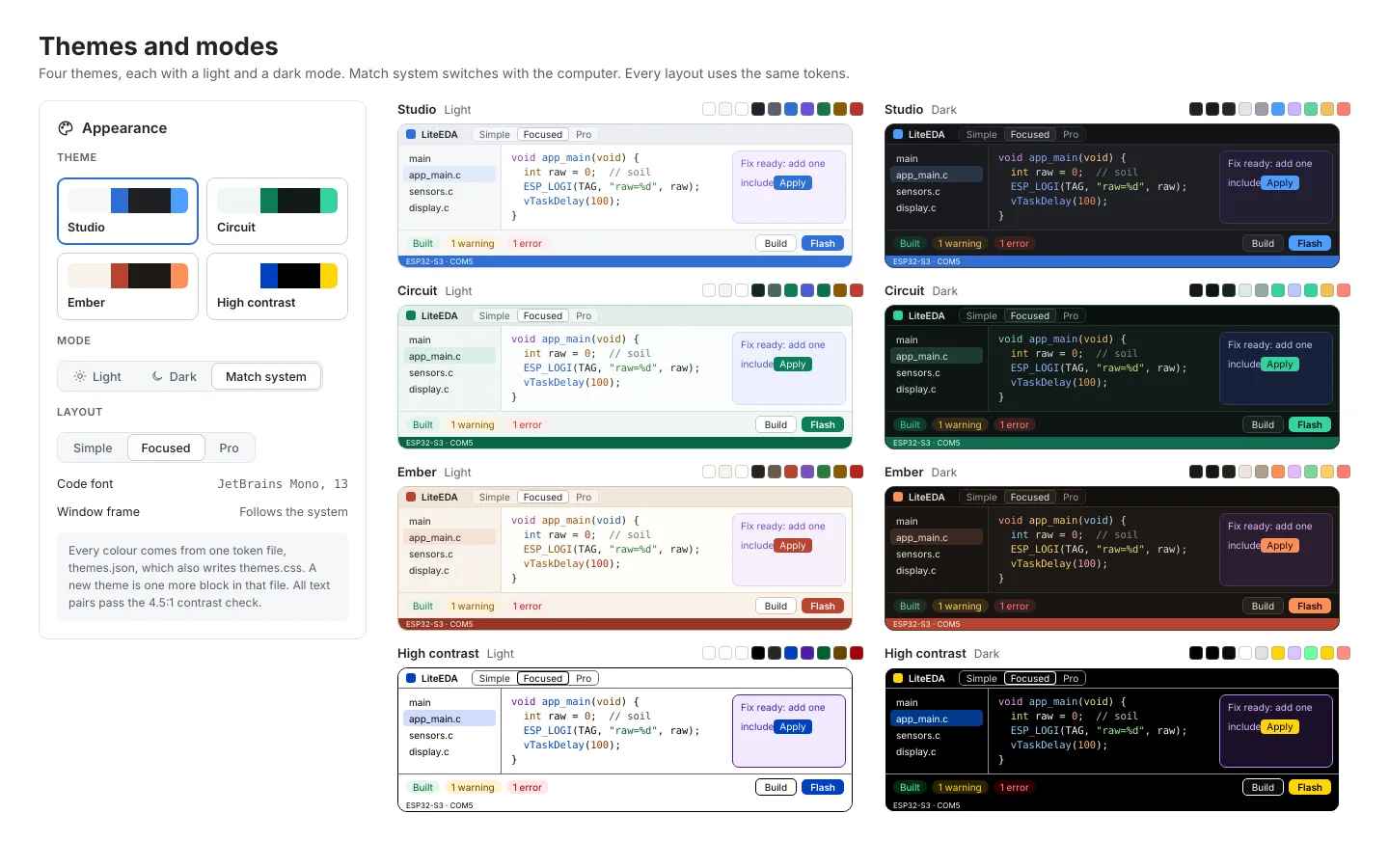
Simple, Focused and Pro lay out the same project in different ways, and Pro adds live pins, memory and a signals plot beside the code. Switch between them and between light and dark. These are design renders with example values, from the LightEDA README.
Simple


Focused


Pro


From first run to a flashed board
Each step below is one of the workflow pictures from the LightEDA README. Pick a step to see it.


Every screen in the README
All 107 screenshots from LightEDA's README, from the build page to the timing diagram. Pick a topic, then open any image to page through it full size.
-
How it works
-
 Toolchains and components on demand
-
 Toolchains and components on demand
-
Toolchains and components on demand
-
Build, flash and known errors
-
Build, flash and known errors
-
 Arduino
-
 Arduino
-
The FPGA flow
-
 Dev doors: flashing without the buttons
-
 Dev doors: flashing without the buttons
-
 Dev doors: flashing without the buttons
-
Board memory
-
 Live pins and tasks
-
 USB access on Linux
-
 The code editor and the Loop
-
 The code editor and the Loop
-
 Auto-indent for Verilog and VHDL
-
 Auto-indent for Verilog and VHDL
-
The assistant asks first
-
 LVGL screen designer and parts
-
 LVGL screen designer and parts
-
 LVGL screen designer and parts
-
 LVGL screen designer and parts
-
 LVGL screen designer and parts
-
 LVGL screen designer and parts
-
 LVGL screen designer and parts
-
LVGL screen designer and parts
-
 Tools page
-
 Tools page
-
 Tools page
-
 GlassVGL theme pack for LVGL
-
 LightEDA for iPad
-
 LightEDA for iPad
-
 LightEDA for iPad
-
 ESP32 labs
-
 ESP32 labs
-
 ESP32 labs
-
 Board and wiring drawings
-
 Board and wiring drawings
-
 Board and wiring drawings
-
 Board and wiring drawings
-
 Board and wiring drawings
-
 Board and wiring drawings
-
 Board and wiring drawings
-
 Board and wiring drawings
-
 Board and wiring drawings
-
 Board and wiring drawings
-
 Board and wiring drawings
-
 Board and wiring drawings
-
 Board and wiring drawings
-
 Board and wiring drawings
-
 Board and wiring drawings
-
 Board and wiring drawings
-
 Board and wiring drawings
-
 Simulate: test benches in Verilog and VHDL
-
 Simulate: test benches in Verilog and VHDL
-
 VHDL test files (.tests)
-
 VHDL test files (.tests)
-
 The timing diagram (Scope tab)
-
 The timing diagram (Scope tab)
-
 The timing diagram (Scope tab)
-
 The timing diagram (Scope tab)
-
 On-chip debugging (JTAG and SWD)
-
 On-chip debugging (JTAG and SWD)
-
 On-chip debugging (JTAG and SWD)
-
 On-chip debugging (JTAG and SWD)
-
 On-chip debugging (JTAG and SWD)
-
 On-chip debugging (JTAG and SWD)
-
 On-chip debugging (JTAG and SWD)
-
 On-chip debugging (JTAG and SWD)
-
 FPGA JTAG chain scan
-
 FPGA JTAG chain scan
-
 FPGA JTAG chain scan
-
 Design board and co-simulation
-
 Design board and co-simulation
-
 Design board and co-simulation
-
 Design board and co-simulation
-
 Design board and co-simulation
-
 Design board and co-simulation
-
 Circuit simulation
-
 Circuit simulation
-
 Circuit simulation
-
 Circuit simulation
-
 TI LaunchPads with Code Composer Studio (Pro)
-
 TI LaunchPads with Code Composer Studio (Pro)
-
 TI LaunchPads with Code Composer Studio (Pro)
-
 TI LaunchPads with Code Composer Studio (Pro)
-
 TI LaunchPads with Code Composer Studio (Pro)
-
 Inverters: OpenIBR and the IEEE 2800 test profiles
-
 Inverters: OpenIBR and the IEEE 2800 test profiles
-
 LightEDA Pro and licences
-
 LightEDA Pro and licences
-
 LightEDA Pro and licences
-
 LightEDA Pro and licences
-
 LightEDA Pro and licences
-
Layouts and themes
-
Layouts and themes
-
Layouts and themes
-
Layouts and themes
-
Layouts and themes
-
Layouts and themes
-
Layouts and themes
-
Themes
-
 Glass panels
-
 Glass panels
-
 Glass panels
What Pro adds
Circuit simulation at the default settings, including co-simulating several boards, stays free. Pro is for TI boards and for full control of the simulator.
| Feature | Free | Pro |
|---|---|---|
| ESP-IDF 6.1 build, menuconfig and flash | Yes | Yes |
| Arduino sketches through arduino-cli | Yes | Yes |
| FPGA builds with Yosys and nextpnr | Yes | Yes |
| Verilog and VHDL test benches, timing diagram | Yes | Yes |
| On-chip debugging over JTAG and SWD | Yes | Yes |
| LVGL 9.6 screen designer with C export | Yes | Yes |
| Circuit simulation and co-simulation at default settings | Yes | Yes |
| TI LaunchPads with your own Code Composer Studio (Windows and Linux): MSPM0, MSP430, MSP432, Tiva C, C2000, SimpleLink and Sitara | No | Yes |
| Full simulation control: solver settings, sweeps, noise, model editing and netlist export | No | Yes |
| Co-simulation run length and step, and KiCad netlist export | No | Yes |
One price, yours to keep
Every Pro key is lifetime and works offline. There is no subscription.
-
 LightEDA
Free
$0
The whole build, flash, FPGA, simulation, debugging and designer toolset.
At launch -

 LightEDA
Student
Later price $30.99$20.99Launch price: $10 off for a limited time
A lifetime Pro key for one student, after a check of your school email.
- Everything in Standard
- Email from your school address for a one-time code
- The code brings the $39.99 launch price to $20.99
-

 LightEDA
Standard
Later price $59.99$39.99Launch price: $20 off for a limited time
A lifetime Pro key for one person.
- TI Code Composer integration: TI's toolchain in a redesigned workspace, built in the cloud
- Windows and Linux for TI today, with macOS as the goal
- Cross-board co-development: several boards from real, purchasable parts on one design board
- Co-simulation of those boards together, with full control of the run
- A lifetime key that never expires
-
LightEDA
University and business
Contact for pricing
A site licence with seats for a lab, department or company, plus training or custom development if you need it. Seats and any custom work are quoted per job.
Ask for a quote
Prices are in US dollars, one-time, with no subscription. Checkout runs on Gumroad, which takes the payment, adds sales tax or VAT where it applies and emails your receipt. Your licence key follows by email within one working day.
Get one email on launch day
Leave your email and Gumroad will tell you when LightEDA Pro goes on sale. Every email it sends has an unsubscribe link.
The list is kept by Gumroad, the store that will sell LightEDA Pro. This site never sees your address.
Questions
Is LightEDA a schematic or PCB tool?
No. It is not a KiCad or EasyEDA replacement. The "EDA" is the FPGA side: synthesis, place and route and the bitstream, the electronic design automation steps that usually need a vendor suite.
Which FPGA boards work?
The iCEBreaker (iCE40 UP5K), ULX3S 12F and 85F (ECP5), and the Tang Nano 9K, Tang Nano 20K, Tang Primer 25K and Tang Mega 138K (Gowin). Other boards in these three families work with your own constraints file.
How does the student price work?
Email [email protected] from your school address and you get a one-time code that takes the Student plan from the $39.99 launch price to $20.99 at checkout. The code works once and expires after 14 days. If your school gives you no email address, send proof of current enrolment instead.
How do I get my licence key?
It is emailed to you within one working day of your purchase. Enter it in LightEDA under Settings > Licence. The key checks offline and never expires.
Can I get a refund?
Yes, within 14 days of buying. Reply to your Gumroad receipt or email [email protected].
When does it launch?
When the first signed build is ready to download. Join the waitlist and you'll get one email on the day.
Want to help it ship?
LightEDA is built by one person. The Support page lists the ways to back it before launch, and GlassVGL, the glass theme that ships with a starter design for its LVGL designer, is on sale now.
Questions about LightEDA?
Ask about features, licensing, pricing or setup. Your email goes to [email protected] and the reply comes back to your inbox.