
 OpenCarMind
An open-source OBD2 logger for the ESP32, with the AI on the chip
OpenCarMind turns an ESP32 board and a Bluetooth LE ELM327 adapter into a car data logger and dashboard. A small neural network on the chip reads your driving and estimates what the OBD port doesn't report, and one of its two models keeps learning your car while you drive. No phone, no account and no cloud.
- ESP32-S3
- ESP-Mosaico (ESP32-S31), early access
- ESP-IDF 6.1
- ELM327 over BLE
- MIT licence
New OpenCarMind EdgeOS 2.1.0 for the ESP-Mosaico adds AI services for the battery and the radios, and a Health app that explains them in plain words.
The desktop installers are not code-signed yet. On macOS, right-click the app and choose Open the first time. On Windows, SmartScreen warns you: choose More info, then Run anyway. Every file has a checksum and GitHub build provenance on the release page.

- 70standard Mode 01 OBD fields decoded, plus the VIN and trouble codes
- 2on-board models: CarMind E.V, fixed and tested, and CarMind R.E.V, which learns
- 3AI services on the ESP-Mosaico: battery estimator, battery fault check and network guard
- 0accounts, apps or cloud servers needed. Your drives stay on your card
A logger that does the thinking on the board
Most car loggers stream your driving to a server and do the work there. OpenCarMind runs its network on the microcontroller, the way TinyML work does, and keeps everything it records as plain CSV, JSON and text on a card you hold.
Every field your car reports
All the standard Mode 01 fields the car answers (70 are decoded), battery voltage, the VIN, and stored, pending and permanent trouble codes. One CSV row per poll cycle.
AI on the chip
A multi-task 1D CNN classifies the last 5 seconds as stopped, braking, accelerating or cruising, and estimates brake pressure, flywheel torque and fuel rate, three values the OBD port doesn't report.
Learns your car
CarMind R.E.V updates part of its model on the board from what your car reports while you drive, with no computer or cloud in the loop. What it learns stays on your SD card.
Safe to turn off
A save every 10 seconds and a power-off line that turns green once everything is on the card. The drive ends by itself 15 seconds after the engine computer stops answering.
Honest fuel economy
km/L, or mpg in the US and the UK, from the best source your car has. A car that reports nothing shows "--", never a made-up number. Fill-ups you enter calibrate it.
Wi-Fi only for the clock
Wi-Fi is optional and asks one HTTPS time server for the time while you're parked on a known network. It sends nothing else, listens on no port, and you can compile it out.
AI services that look after the board itself
The same firmware runs on Espressif's ESP-Mosaico touch-screen board (ESP32-S31). Its newest build, OpenCarMind EdgeOS 2.1.0, adds three small AI services and a Health app that tells you about them in plain words.
Health app
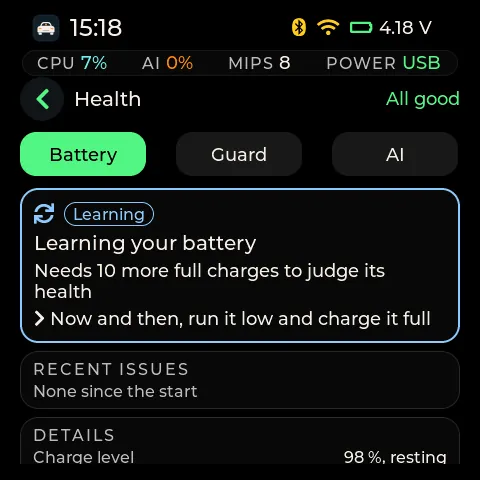
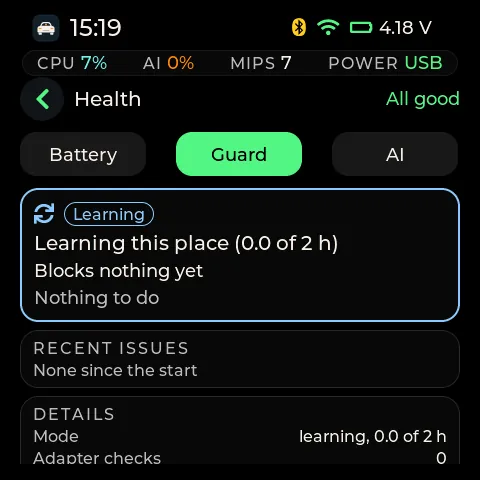
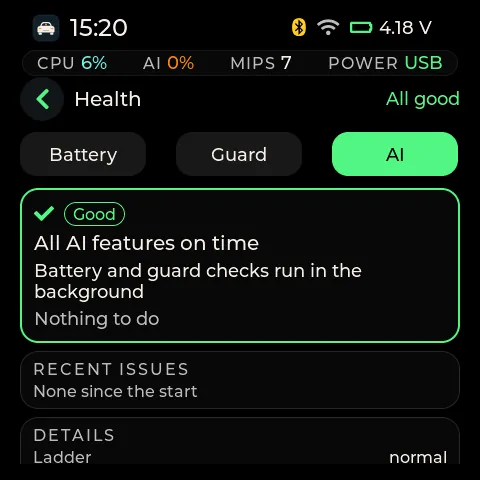
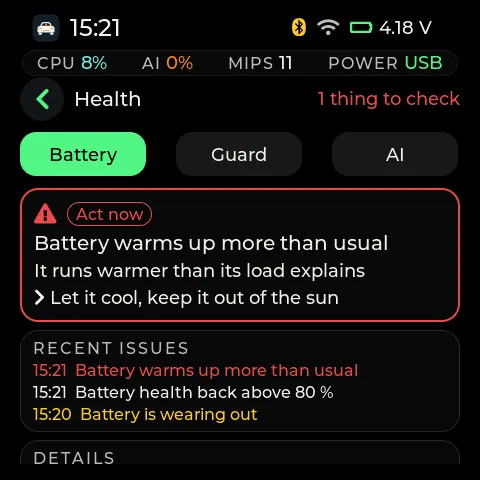
Three pages: Battery, Guard and AI. Each opens with one card that gives a colour and a word (Good, Learning, Check soon, Act now), what is wrong, what it means and what to do. While you drive, a "check soon" issue is only logged.
Battery charge and health
An extended Kalman filter on a one-RC cell model gives the state of charge. State of health comes from a full-to-cutoff count or a small regression on partial charges. The board learns your cell from its first 10 charges.
Battery fault check
A small autoencoder learns what normal looks like for your cell over its first 24 hours. When 60 seconds of readings stop looking normal it names the likely reason, such as "warms up more than usual". It never cuts power by itself.
Network guard
An unsupervised detector watches for floods of new Bluetooth addresses and rotating Wi-Fi access points. It only learns for its first 2 hours in a place, and a block only narrows the scan to your paired adapter. It never cuts your adapter during a drive.
Pairing safety
The board keeps a fingerprint of your adapter and asks before it pairs again or uses one that behaves differently. It refuses a Wi-Fi time that jumps more than 24 hours ahead or 10 minutes back.
Out of the way
All three services share one worker task below the screen, the models and the OBD poll, so any of those can preempt them. When the board is busy, the services are the first thing it slows.
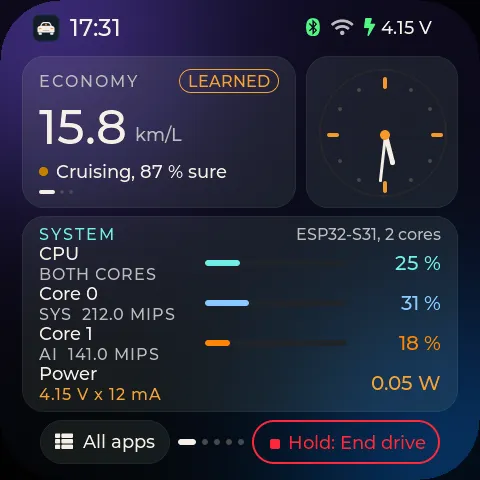
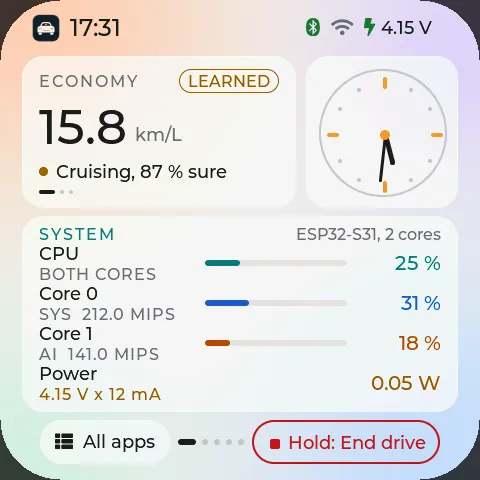
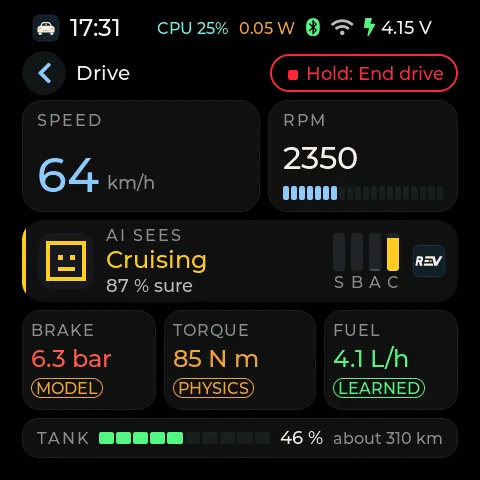
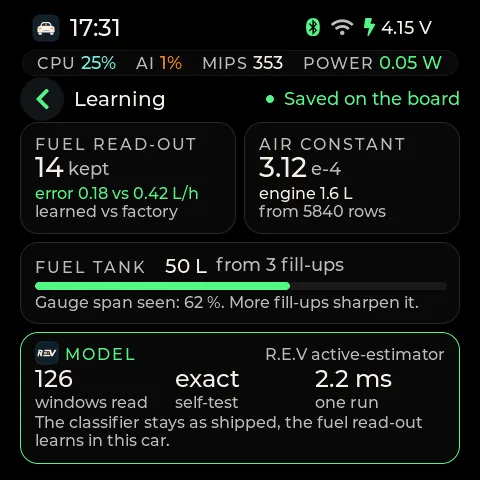
An AI-first layer on FreeRTOS, not a new kernel
FreeRTOS, as ESP-IDF 6.1 ships it, still schedules the tasks on the S31's two cores. EdgeOS is a set of rules on top that decide what may run, when and how fast, and what happens when something goes wrong. It adds no task of its own.
Every model is a soft real-time job
A model has to answer once a second while the OBD poll and the learner share its core. When a model loads, the OS takes its self-test run time, doubles it as a worst case, and runs a response-time analysis for every job on that core. The model is admitted only if every deadline on the core still holds. If one would slip, the switch is undone like a failed load.
When deadlines slip, it steps down in order
The board gives up the screen rate first, then learning, then the model, so the drive log keeps running. Three bad restarts in a row put it in a safe mode with logging on.
Small on purpose
Against the previous Mosaico build, EdgeOS 2.0.0 adds 25,840 bytes to the app image (76% of the 6 MB slot) and 2,074 bytes of static internal RAM, and no new tasks. Of 28 checks from two board passes, 21 are verified by a board log line, with a third pass running on the 2.1.0 build.

Choose your model
You switch between them in the desktop app, or under Settings on the ESP-Mosaico. Both use the same fill-up calibration.
| CarMind E.V | CarMind R.E.V | |
|---|---|---|
| Size on the chip | about 89 KB | about 66 KB |
| Parameters | 38,679 | 19,815 |
| Time per run on the ESP32-S3 | about 3.5 ms in the car | about 2.9 ms in the car (median) |
| Learns in your car | No, the model is fixed | Yes: its fuel estimate and an airflow constant, so its torque estimate learns your engine too |
| Best for | A fixed, tested model | Older cars, roughly pre-2020, with no fuel-rate PID that can lose the airflow (MAF) reading |

A desktop app and a dashboard that stay local
Desktop app
For Windows, macOS and Linux. Over the board's USB cable it pairs with the board, sets Wi-Fi, time zone and settings, imports drives, charts them, flashes new firmware and keeps your fill-up log, so the SD card never has to come out.
Drive reports
A script turns a session folder into one HTML report per drive, and Dashy shows them on your own computer or home server. Nothing is sent to the internet.
Build it yourself
ESP-IDF 6.1 and Python 3: set the target to esp32s3, build and flash. User manuals for both boards are in the repo.

1. Download
Get the firmware image for your board and the desktop app from the releases page. The ESP32-S3 and ESP-Mosaico images are not interchangeable.
2. Flash the board
Write the image to the board over USB, as the flashing guide shows, then pair the board with the desktop app over the same cable.
3. Pair and drive
Plug the Bluetooth LE OBD-II adapter into the car, pair the board with it, and drive. Each drive is saved on the board and imported by the desktop app.
What you need
- A Waveshare ESP32-S3-LCD-1.47B board and a FAT-formatted SD card, or an Espressif ESP-Mosaico V1.2 (ESP32-S31), which needs no SD card.
- A Bluetooth LE adapter that speaks ELM327 commands. The LELink is the one driven with the board so far. Classic-only Bluetooth adapters won't work, because the S3 has no classic radio.
Not checked yet: R.E.V over many drives and other cars, other boards, and adapters other than the LELink. The field checks that need a car are in the repo, with tables you can fill in.
Questions
Is OpenCarMind free?
Yes. The firmware, the desktop app and the dashboard are open source under the MIT licence. Downloads are on the GitHub Releases page.
Does it need a phone or an internet connection?
No. The board reads the car over Bluetooth LE, runs its models on the chip and writes drives to its own storage. Wi-Fi is optional and only sets the clock.
Which OBD2 adapters work with the ESP32?
Bluetooth LE adapters that speak ELM327 commands. The LELink has been driven with the board. Others such as the Veepeak OBDCheck BLE are expected to work from their documents but aren't tested yet.
Why does the installer show a warning?
The desktop installers are not code-signed yet. macOS asks you to confirm the first launch: right-click the app and choose Open. Windows SmartScreen shows a warning: choose More info, then Run anyway. Each file has a SHA256 checksum and build provenance from GitHub on the release page.
Where is the documentation?
The OpenCarMind documentation covers both boards: what you need, flashing, the desktop app, the models and the release notes.
What is OpenCarMind EdgeOS?
The ESP-Mosaico build of OpenCarMind. It adds an operating-system layer on FreeRTOS that admits each AI model only if its deadlines hold, plus a boot health check, battery protection and, since 2.1.0, AI services for the battery and the radios.
Put the AI in your car, not in the cloud
Questions about OpenCarMind?
Ask about features, licensing, pricing or setup. Your email goes to [email protected] and the reply comes back to your inbox.